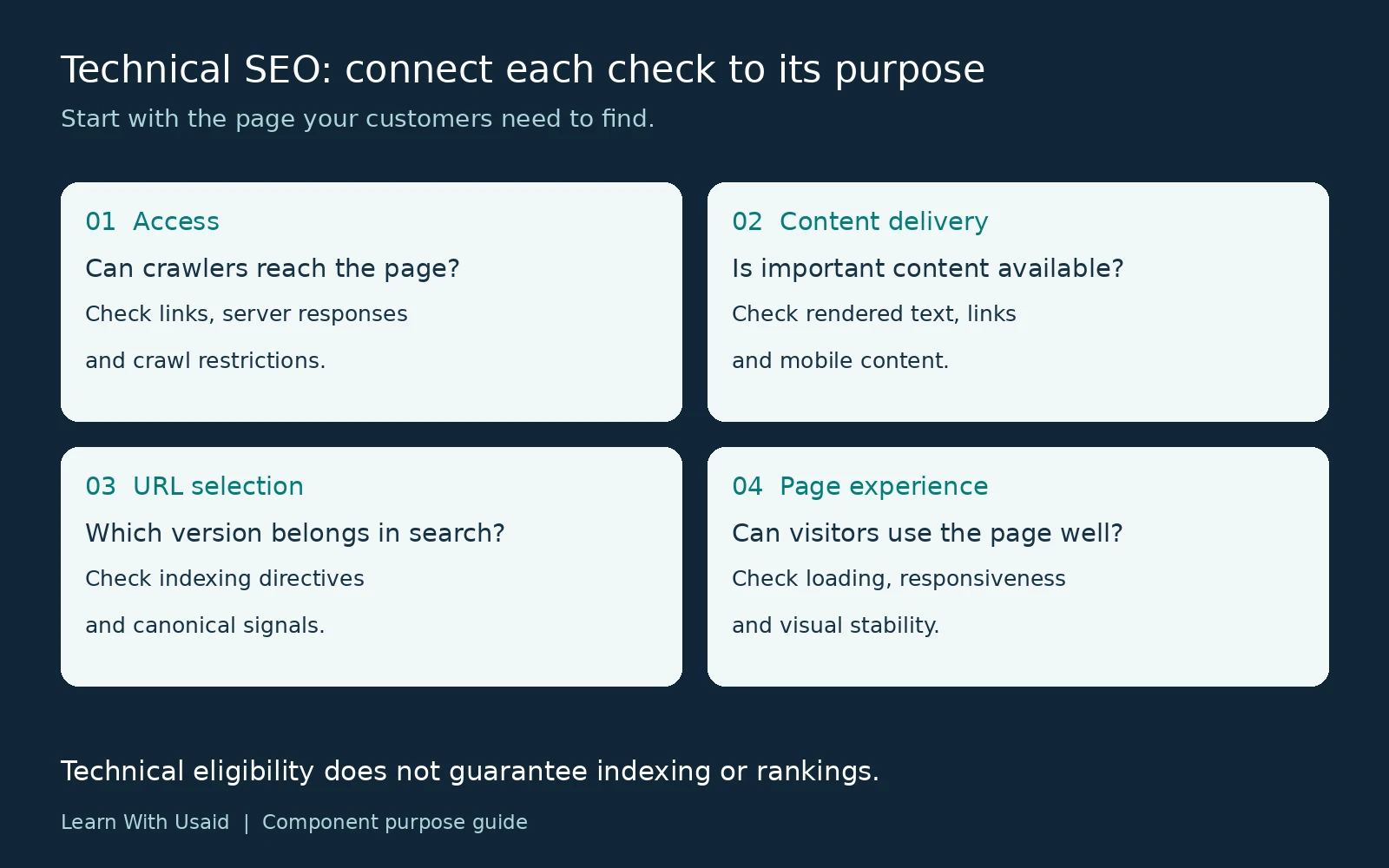
Technical SEO improves a website’s technical setup so search engines can access, process, and understand its content. It covers crawl access, indexing controls, URL handling, internal navigation, rendering, and page performance. These foundations support search visibility, but they do not guarantee rankings.
For a business owner, the practical question is simple: can the right customers find and use your important pages? A service page might explain your offer clearly yet have an accidental indexing restriction. Another might be accessible but deliver its main description only through JavaScript that fails to load. Each problem needs a different investigation.
What does technical SEO include?
Technical SEO includes the systems that make a website accessible, help search engines interpret its URLs, and deliver usable content. The table below connects each area to a business purpose.
| Area | Purpose | Example question |
|---|---|---|
| Crawl access | Let crawlers retrieve intended public pages. | Is the main service page accessible without a login or accidental block? |
| Indexing and URL selection | Communicate which pages should appear in search and which duplicate version is preferred. | Does a tracking URL point to the correct canonical version? |
| Site architecture | Connect useful pages through understandable navigation and links. | Can visitors reach a service guide from a relevant page? |
| Rendering | Make important text and links available when the page is processed. | Does the service description appear in the rendered output? |
| Page experience | Support loading, interaction, and a stable layout. | Does a moving banner interrupt the contact form? |
| Specialist checks | Handle structured data, regional versions, and site changes appropriately. | Will a redesign preserve useful URLs and content? |
The scope depends on the website. A small service business and a large international store do not need identical audits. Start with the pages that explain your services, support customer decisions, or generate inquiries.

Why is technical SEO important?
Technical SEO matters because access and processing problems can keep useful public content out of search. A better service description cannot correct an accidental indexing restriction; the restriction needs its own fix.
Google’s minimum technical requirements include allowing Googlebot access, returning a successful HTTP response, and providing indexable content. Meeting these requirements makes consideration possible; it does not guarantee indexing. A simple example of technical SEO is removing an unintended noindex directive from a public service-page template and verifying the corrected output.
How do discovery, crawling, rendering, and indexing connect?
Discovery identifies a URL; crawling retrieves it; rendering processes the page; indexing analyzes its content for potential inclusion in search. Ranking is a separate question about which results appear for a particular search.
- Discovery: Google learns about an address through sources such as links or a sitemap.
- Crawling: Googlebot requests the page and receives a response.
- Rendering: Google processes the page, including JavaScript, to access content that may not appear in the initial HTML.
- Indexing: Google analyzes the content and considers its inclusion in the index.
Imagine a newly published consulting page. A navigation link can help Google discover it, but discovery does not prove that it has been crawled or indexed. Likewise, an indexed page is not guaranteed to rank prominently for “business consultant.” Google’s explanation of how Search works distinguishes crawling, indexing, and serving results.
Use that distinction when diagnosing a problem: first establish which stage is involved, then investigate the relevant evidence.
If your website is not showing up on Google, check the exact URL’s index status before choosing an indexing or ranking investigation.
If Search Console reports Discovered – Currently Not Indexed, investigate why a known URL has not yet been crawled. If it reports Crawled – Currently Not Indexed, the investigation starts after a crawl. These reports describe different stages; neither label identifies a single cause by itself.
Which controls affect access and URL selection?
Choose a control according to what the URL should do. Restricting crawling, excluding a page from search, and identifying a preferred duplicate are different tasks.
| Control | What it does | Important boundary |
|---|---|---|
| robots.txt | Manages crawler access to specified paths. | Blocking crawling does not reliably remove a URL from search. |
| noindex | Instructs search engines not to index the page. | Google must be able to crawl the page to discover the instruction. |
| XML sitemap | Helps communicate URLs you want search engines to discover. | Submission does not guarantee crawling or indexing. |
| Canonical annotation | Indicates the preferred version among duplicate or very similar pages. | It is a signal; Google may choose a different canonical. |
Suppose /consulting/ and /consulting/?campaign=email show the same content. A canonical signal can identify the preferred version while both addresses remain usable. A permanently moved page requires a different decision, and a private customer area needs actual access protection.
Check the relevant documentation before changing settings: robots.txt, noindex, sitemaps, and canonical signals. A setting that removes a warning may still be wrong for the page’s intended purpose.
What should HTTP responses and redirects communicate?
An HTTP response should match what happened to the requested page. A working public page, a permanent move, a missing page, and a server failure need different responses.
| Situation | Response | What to check |
|---|---|---|
| Public content loads successfully | 200 | The response contains useful content, not an error screen. |
| Page permanently moved to an equivalent replacement | 301 or 308 | The destination is relevant and works; internal links use the destination. |
| Page removed without a replacement | 404 or 410 | Internal links and sitemap entries no longer advertise it. |
| Server cannot fulfill the request | Appropriate 5xx error | Investigate hosting or application failures. |
A 200 response does not prove that a page is useful or indexed. Google may treat an empty or error-like page as a soft 404. Use Google’s HTTP status guidance when interpreting responses.
Should duplicate URLs use a canonical or a redirect?
Use a canonical annotation when duplicate versions remain accessible and you want to signal a preferred URL. Use a permanent redirect when the old address should send visitors to its replacement. These choices differ because a canonical leaves the original address usable, while a redirect changes the visitor’s destination.
Align internal links, sitemap URLs, and canonical signals with the intended preferred version. An HTTPS page should not identify an obsolete HTTP duplicate as its preferred version accidentally. Google weighs multiple canonicalization signals; an annotation is not an instruction that guarantees Google’s selection. Private material needs authentication, regardless of any search directive.
How do navigation and rendering affect available content?
Navigation provides routes between pages. Rendering determines what content is available after a page is processed. Both matter, but their symptoms and fixes differ.
Navigation example: a useful service guide exists, but no relevant page links to it. Review its place in the site structure and add a descriptive link where readers would naturally need the guide.
Rendering example: a service page loads, but its description is missing from the tested rendered output. Investigate the scripts, resources, and loading behavior responsible for that content.
These are hypothetical examples, not reported client results. The first calls for a navigation review; the second calls for a content-delivery investigation. Google can process JavaScript, but implementation problems can prevent important content from becoming available. Its JavaScript SEO documentation explains the processing involved.
How do breadcrumbs and pagination support navigation?
Breadcrumbs show a page’s place in a site hierarchy, such as Home → Services → Technical SEO. The visible trail helps visitors navigate. Breadcrumb structured data describes that hierarchy for supported search features; it is a separate implementation check.
Pagination divides a collection into linked pages. Give each page a distinct URL and crawlable links to the next relevant pages. A “load more” button alone is not evidence that Google can discover every item. Check Google’s pagination guidance against the actual HTML and loading behavior.
Where do performance, mobile, and specialist checks fit?
Once a page can be accessed and processed, review how reliably it works for visitors and whether specialist requirements apply.
- Performance: Core Web Vitals cover loading, responsiveness, and visual stability through LCP, INP, and CLS. Investigate the experience behind a poor result instead of treating a score as the whole SEO strategy. Good Core Web Vitals do not guarantee top rankings.
- Mobile content: Google uses the mobile version for indexing. Keep important content and relevant metadata available on mobile. An accordion can be appropriate; content that loads only after a user interaction needs closer review. See Google’s mobile-first guidance.
- HTTPS: Review secure page delivery and insecure embedded resources as part of the site’s technical maintenance.
- Structured data: Use applicable markup that accurately represents visible content. Passing validation does not guarantee a rich result; follow the structured data guidelines.
- Regional versions and migrations: Add these checks when the site targets distinct language or regional versions, or when a release changes URLs and content delivery.
For example, a business serving one market should not add regional pages merely to make its technical checklist longer. A company planning a redesign should instead make preservation of useful pages part of the release plan.
How should you measure technical page performance?
Measure loading, interaction, and layout stability separately, then investigate the element or behavior causing the problem. A single overall score can conceal which experience needs attention.
| Metric | Experience measured | Good-experience target |
|---|---|---|
| Largest Contentful Paint (LCP) | Loading of the largest visible content element | 2.5 seconds or less |
| Interaction to Next Paint (INP) | Responsiveness to interactions | 200 milliseconds or less |
| Cumulative Layout Shift (CLS) | Unexpected visual movement | 0.1 or less; a unitless score |
These Core Web Vitals thresholds apply to the 75th percentile of page loads, assessed separately for mobile and desktop. Field data reflects real visits; a lab test reproduces a controlled scenario. Use lab diagnostics to investigate a problem, then monitor field results where sufficient data exists. An absent field report is not a passing result.
When do advanced technical SEO checks become necessary?
Advanced checks become useful when the site’s size, architecture, or release introduces a specific risk. Large catalogs may need faceted-navigation and crawl analysis. JavaScript applications may need rendering tests. Multilingual sites may need checks of language annotations and equivalent-page relationships.
Crawl budget concerns how much a crawler can and wants to crawl. It is mainly a consideration for large or frequently changing sites; it should not become the default diagnosis for a small site’s indexing delay. Google’s crawl-budget guide defines when deeper investigation is appropriate.
A migration needs an inventory of valuable URLs, equivalent destinations where available, redirect checks, updated internal links, and post-release monitoring. International versions need consistent language targeting and appropriate hreflang relationships. Neither project should be reduced to a generic plugin score.
How is technical SEO different from other SEO work?
Technical SEO focuses on the website’s systems. On-page SEO focuses on how a page explains and organizes its subject. Off-page SEO concerns relevant signals and relationships beyond the site.
| Problem | Main area of work | Illustrative action |
|---|---|---|
| A template excludes public service pages from indexing. | Technical SEO | Investigate and correct the unintended directive. |
| A service explanation leaves important customer questions unanswered. | On-page content | Improve the explanation with useful details and evidence. |
| A business has few relevant external references. | Off-page work | Develop legitimate relationships and opportunities for editorial coverage. |
These responsibilities overlap. A writer may improve a service description while a developer fixes the template that fails to deliver it. Assign the work according to the problem and required skills, keeping the reader’s needs consistent across both tasks.
How do you perform a technical SEO audit?
A technical SEO audit compares how important pages should work with evidence of how they actually work. The result should be a prioritized implementation plan, not an unfiltered export of tool warnings.
- Define the page set. Include important service or category pages and representative examples from each template. Record which URLs should be public, indexable, redirected, or private.
- Inspect access and responses. Check response codes, robots rules, indexing directives, and canonical targets for those URLs.
- Check discovery and content delivery. Review internal links, sitemap entries, and rendered text and links. Compare mobile delivery with the intended content.
- Test relevant experience and markup. Investigate performance, HTTPS, and applicable structured data. Add migration, regional, or catalog checks when the site requires them.
- Assign and verify fixes. Record the evidence, proposed action, owner, and acceptance check. Retest the affected page and shared template after deployment.
Which tools provide useful audit evidence?
Choose tools according to the question they can answer. Search Console, a crawler, performance diagnostics, and server evidence describe different parts of a website’s behavior.
| Question | Evidence source | Limit |
|---|---|---|
| What does Google report about this URL? | Search Console URL Inspection | Indexed information and a live test are different views. |
| Which pages share a broken link or directive? | A configured site crawler, such as Screaming Frog or Semrush Site Audit | Results depend on scope, access, and rendering settings. |
| What slows loading or causes layout movement? | PageSpeed Insights and browser diagnostics | Lab diagnostics and real-user measurements are not interchangeable. |
| Is supported structured data valid? | Google Rich Results Test | A valid result does not promise a search enhancement. |
| Which requests reached the server? | Server logs | Requests do not prove indexing or ranking. |
Google’s URL Inspection documentation explains what each view can establish. For example, a successful live test does not establish that the tested version is already indexed. Preserve the test date and the exact URL with your evidence.
What is a technical SEO specification?
A technical SEO specification defines the required behavior of a website or template before implementation. It states the intended URL rules, response codes, indexability, canonical relationships, content delivery, and acceptance tests.
For example: “Public service pages must return 200, display their main description in rendered mobile HTML, and contain no unintended noindex directive.” A developer can test those requirements. “Improve SEO” alone is not a testable specification.
Which issue should a business investigate first?
Start with an evidenced problem affecting an important page. Consider the page’s business purpose, the number of affected URLs, and dependencies between fixes.
Suppose your main service page has an unintended noindex directive, while an old announcement has an optional enhancement warning. Investigating the service page would normally be the more useful first step. This is an illustrative prioritization decision, not a universal scoring rule.
Create a short issue record with six fields:
- Affected URL or template: where the problem occurs.
- Observation: what you actually found.
- Evidence: the response, rendered output, or report supporting the finding.
- Action: the proposed change and its purpose.
- Owner: who will implement it.
- Acceptance check: how you will verify the correction.
For the example above, an acceptance check could confirm that the unintended directive is absent from the public page. Later search visibility is a separate outcome to monitor. This keeps implementation success distinct from a ranking promise.
How do you know whether a technical SEO change worked?
First confirm the intended technical behavior; then monitor the search outcome separately. Removing an unintended directive is an implementation result. A later change in indexing, impressions, clicks, or inquiries is an observed outcome with other possible influences.
Record the release date and affected URLs. Compare relevant page and query groups over comparable periods in Search Console, with consistent country, device, and search-type filters. Consider seasonality and other site changes before attributing a movement to one fix. Two days without new impressions does not, by itself, establish that the fix failed.
Review important templates after releases and revisit outstanding issues on a schedule suited to the site’s rate of change. There is no useful universal promise that every technical fix will produce traffic within a fixed number of days.
How does technical SEO change for WordPress and ecommerce sites?
The goals remain access, correct URL handling, and usable content, but the implementation depends on the platform and the pages it generates. WordPress often requires coordination between core software, themes, plugins, and hosting; ecommerce sites add catalog and filtering decisions.
What should you check on a WordPress website?
Check the generated output before assuming a theme or plugin owns a feature. WordPress core includes basic XML sitemap functionality, normally exposed through /wp-sitemap.xml. A plugin can alter or replace that output.
Inspect robots directives, canonical URLs, sitemap contents, schema entities, and visible breadcrumbs on representative published pages. If two components generate conflicting metadata or duplicate representations of the same entity, configure responsibility deliberately. An SEO plugin can help manage settings; installing it does not establish that the final output is correct or repair every theme, server, and rendering problem.
What additional checks do ecommerce sites need?
Ecommerce sites need deliberate rules for products, variants, categories, filters, and pagination. Each URL type should have an intended purpose before you choose its indexing or canonical behavior.
Decide which filtered collections provide distinct value, how visitors reach products, and what happens when an item becomes unavailable. Do not canonicalize every filtered page to a broad category automatically: genuinely different collections may need their own treatment. Record these decisions at the template level so the implementation remains consistent as the catalog grows.
Does technical SEO require coding, and how can beginners learn it?
Technical SEO requires understanding web behavior, but not every task requires writing code. You can inspect URLs, identify directive problems, and document findings with tools. Changing application rendering, server rules, or shared templates may require a developer.
Begin with HTTP responses, HTML links, robots directives, canonicals, and sitemaps. Practice on a small site you control: state the expected behavior, collect evidence, make one controlled change, and retest it. Then study JavaScript rendering, performance, and structured data as your projects require them. This sequence connects technical SEO skills to problems you can explain and verify.
A specialist’s work can include auditing, writing specifications, prioritizing issues, collaborating with developers, and validating releases. The required depth varies with the website; a job title alone does not define the scope.
When should you involve a technical SEO specialist?
Involve a specialist when important pages are difficult to diagnose, a problem affects multiple templates, or a release changes URLs and content delivery. Bring the affected addresses, symptoms, recent changes, and any available evidence.
If you need help deciding which technical issues deserve attention, explore Learn With Usaid’s technical SEO services and discuss your website’s requirements.
A useful starting outcome is a clear explanation of the problem, a proposed action, and a way to verify the change. That gives your business a practical next step while search performance is measured over time.