
Discovered – Currently Not Indexed means Google knows the URL but has not crawled it yet. Review which affected pages should be searchable and examine discovery and access evidence before treating the delay as a specific technical fault.
What does Discovered – Currently Not Indexed mean?
Google knows the address, but it has not crawled it yet according to the reported state. The last crawl date is normally empty for this status.
Google describes rescheduled crawling, including an expected risk of overloading the site, as a typical explanation. That does not prove your host is failing now. Record the exact URL, status, and observation date before attributing the delay to a specific technical fault.
See Google’s Page Indexing report documentation for the status definition. The checks below help organize an investigation; they are not confirmed causes for every affected page.
Where do you find affected pages in Search Console?
Open Indexing → Pages in the correct property, select the Discovered – Currently Not Indexed reason, and inspect an example URL. Export the available examples when you need to compare several affected pages.
Keep the exact address, report date, sitemap association and page type together. Group similar templates before deciding whether you have one delayed article or a broader pattern. “These pages aren’t indexed or served on Google” describes the reported outcome; it does not identify the underlying cause.
Does this status mean Google has penalized the website?
No. This status alone does not establish a penalty. If you suspect a manual action, check Search Console’s Manual Actions report and follow the stated issue, if one is present.
A site missing from a particular search is not sufficient evidence of a manual action. Keep the reported indexing state separate from any independently documented policy issue.
How does it differ from the Crawled status?
The difference is whether crawling has happened. Both states can leave the page absent from search, but they need different starting questions.
If the reported status changes, record the new observation and follow the matching investigation. A move from Discovered to Crawled does not guarantee that indexing will follow immediately.
| Status | What has happened | Investigation focus |
|---|---|---|
| Discovered – currently not indexed | Google knows the URL but has not crawled it yet. | Page purpose, discovery paths, and relevant access evidence. |
| Crawled – currently not indexed | Google fetched the page but has not indexed it. | Post-crawl page and template evidence. |
How do you fix Discovered – Currently Not Indexed?
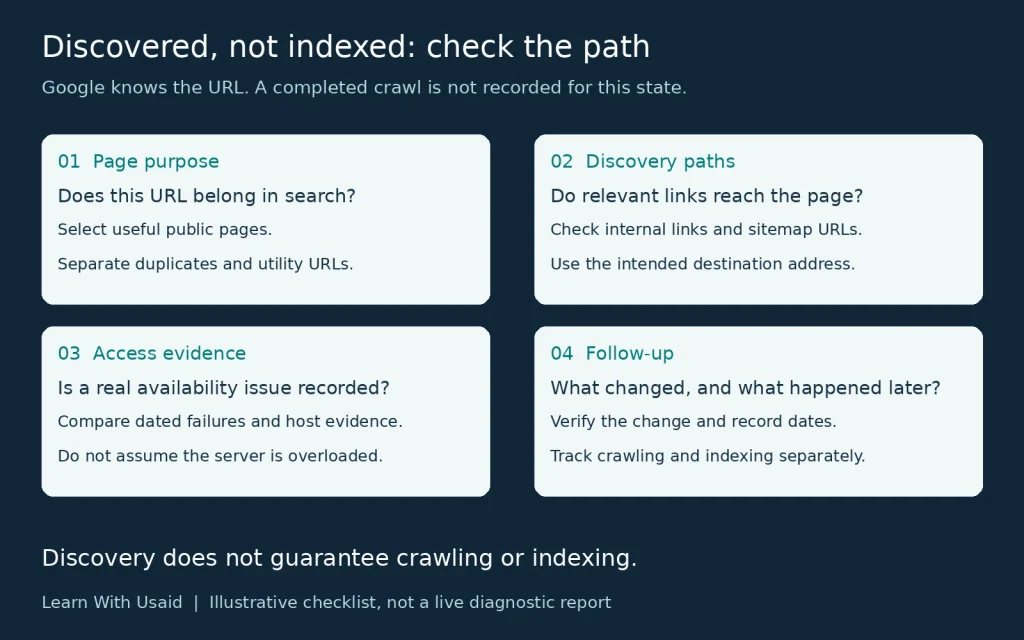
Check whether the URL should appear in search, verify its current availability and internal links, and correct any demonstrated problem. Then request indexing where appropriate and monitor new evidence. There is no universal fix for this status.
- Confirm the address and state. Inspect the preferred URL, including its protocol, hostname and path.
- Decide its search purpose. Prioritize useful public pages over duplicates or private utilities.
- Verify delivery and access. Check the response, main content, crawl rules and any unintended exclusion.
- Review discovery paths. Check relevant incoming links and the sitemap’s preferred URLs.
- Follow up on a specific action. Record a correction, verify the output, and compare later crawl and index observations.
For example, a newly published guide may load correctly but have no incoming link from its topic hub. Add that useful connection and verify it. If the page instead returns a server error, investigate delivery first. These hypothetical situations require different actions even when the initial report label matches.
Which affected URLs actually need attention?
Prioritize pages that have a clear reason to appear in search. Ask whether the URL serves a useful visitor task, remains current and represents the intended version of that content.
For illustration, a business’s main service page might merit prompt investigation. A duplicate filter combination or a utility URL might not need its own search result. Make that decision before treating a growing excluded-URL count as a business loss.
Create a short list with the page purpose, intended search role, reported state and observation date. The list should make it clear why each selected URL deserves attention. Where the intended outcome is uncertain, resolve that uncertainty first.
| Hypothetical URL role | Intended outcome | Question to investigate |
|---|---|---|
| Current public service page | Assess for search visibility | What evidence explains its current discovery/access state? |
| Tracking variant of that page | Assess its relationship to the preferred version | Does it need a separate result at all? |
| Utility page with no search role | Preserve the intended exclusion | Would changing its treatment benefit a visitor? |
Start by checking a page’s index status for the exact address in your verified property. URL Inspection distinguishes stored information from a live test; a successful live test is not proof of indexing. A private utility page needs appropriate access protection, not an indexing request.
Why does the live test pass while the report still says not indexed?
The live test checks the page now; the stored inspection result describes Google’s recorded information. Passing the live test does not move the page into the index.
Compare the exact URL and dates across the individual inspection and list report. If the individual result already says indexed, record that newer observation before editing again. A report that has not updated is a reporting question, not evidence that the same fix must be repeated.
Can important pages be reached through useful links and sitemaps?
Review how a person or crawler could reach the important page from relevant existing content. Check whether the expected internal links exist and point to the intended address. For a suspected orphan page, compare the full URL inventory with the crawl; a crawl alone may not reveal isolated pages.
Check the sitemap’s selected addresses and processing status as well. Google explains that sitemaps assist discovery but do not guarantee crawling or indexing.
In an illustrative three-page path, a service hub links to a useful service page, which links to a supporting guide. The links should make sense to the reader. Adding the guide to every unrelated page is not a substitute for a sensible pathway.
Because Google already knows this URL, discovery has happened. Reviewing links and the sitemap is a consistency check, not proof that an undiscovered page caused this status. Use Google’s sitemap guidance when reviewing the submitted addresses.
Which internal links should you check?
Check incoming links from relevant, accessible pages. A link from the affected page to another article does not establish that another page links back to it.
Use descriptive anchor text and a real <a href="…"> link to the preferred address. Review navigation that relies only on click handlers, accidental nofollow attributes on ordinary editorial links, and links that pass through unnecessary redirects. Google’s crawlable-link guidance explains the supported format.
Choose the link location by the reader’s next task. A comparison of indexing states naturally points to the other state’s guide; a service description may point to a relevant diagnostic explanation. There is no required incoming-link count that guarantees crawling.
Is there evidence of an access or server problem?
Look for recorded availability problems before prescribing a server change. Useful evidence can include dated fetch failures, hosting incidents, response errors and relevant Crawl Stats observations.
Search Console’s Crawl Stats report provides aggregate request and host information. Its example URLs are a sample, so an address missing from that list does not prove it was never requested.
Compare the time of the observation with the affected period. If the site is accessible now but had an earlier incident, preserve both facts. If no access problem has been demonstrated, say so. The appropriate next step may be additional observation or a different investigation rather than buying a more expensive hosting plan.
| Observation to check | Evidence to collect | What it can support |
|---|---|---|
| Page failed to load at a recorded time | Exact URL, response or error, time, and host incident details | Investigating the documented availability problem. |
| A host-level crawl issue was reported | Relevant period and host status in Crawl Stats | Reviewing a broader availability pattern. |
| Page works in the current test | Dated result and any earlier failure records | Current access works; this does not disprove a past incident. |
Google’s Crawl Stats documentation explains the report’s scope and sampled URL examples. The report is primarily for advanced investigation; most small sites do not need routine analysis at this level.
Should you change robots.txt, noindex or canonical settings?
Change a setting only when its actual output conflicts with the page’s intended purpose. These controls perform different jobs, and the discovered label alone does not prove that any of them is wrong.
| Control | Check | Decision boundary |
|---|---|---|
| robots.txt | Does an applicable rule prevent the intended crawler from fetching this public URL? | Correct unintended crawl restrictions; preserve deliberate restrictions. |
| noindex | Does the HTML or HTTP header ask for search exclusion? | Remove an unintended directive on a page meant for search. Google must be able to crawl to read it. |
| Canonical | Does the declared preferred URL represent this content? | Align duplicate-version signals. A canonical is not a command to crawl immediately. |
Do not put noindex in robots.txt or use crawl blocking as access protection. See Google’s noindex instructions and canonical guidance for the implementation distinction.
Does a small site need specialist crawl-budget work?
Not automatically. A small business website should begin with useful pages, sensible internal paths, appropriate sitemap URLs, and any demonstrated access problems. A few delayed URLs do not establish an enterprise crawl-budget problem.
Google’s advanced guidance is aimed mainly at large or rapidly changing sites, but it also includes sites with a large proportion of URLs in the discovered state. The proportion and pattern matter, not just the raw count. Escalate the investigation when scale or evidence justifies it.
Use the applicability criteria in Google’s crawl-budget guidance. Neither changing hosting without evidence nor trying to force a crawler schedule is a substitute for diagnosing the actual pattern.
Can duplicate URLs and redirect chains affect crawling?
They can make the URL inventory harder to maintain and crawling less efficient. Look for parameter combinations, inconsistent hostnames, repeated redirects and internal links to obsolete addresses.
Compare what the URLs actually deliver before consolidating them. A filter that creates no useful new result differs from a category page serving a distinct task. Link directly to intended destinations, use redirects for genuine moves, and keep canonical signals consistent for duplicates. Do not canonicalize every different page to the homepage or block all parameters without reviewing their purpose.
Can content quality matter before Google crawls the page?
Yes, page quality and relevance are part of Google’s published description of crawl demand. However, this status does not tell you that Google inspected this page’s current text or assigned it a low-quality score.
Review a representative set of pages from the same section. Does each page serve a distinct reader task? Does it provide specific, accurate information beyond a reused template? A service guide can explain the required evidence, possible actions and verification steps. Rewriting synonyms or adding length without improving those answers does not establish greater usefulness.
Use Google’s helpful-content questions for that editorial review. Merge genuinely overlapping material only when one page would better serve the reader; do not remove useful pages solely to change an exclusion count.
Do backlinks guarantee that a discovered URL will be crawled?
No. Google describes URL popularity as one influence on crawl demand, but it does not publish a backlink quota that forces crawling or indexing.
Relevant external references can give people another way to reach useful content. They do not replace working page delivery or sensible internal navigation. Record external-link evidence if it helps explain a pattern, rather than treating a link purchase as a technical fix.
How should you check this status on WordPress with Rank Math?
Check the public output of WordPress and the responsible SEO settings. Installing Rank Math or achieving a green content score does not confirm that Google has crawled the URL.
- Confirm the intended post is published and accessible without signing in.
- Review Settings → Reading → Search Engine Visibility. For a public site intended for search, an accidental “Discourage search engines” setting needs correction.
- Inspect the post’s robots and canonical settings in Rank Math, then verify the resulting HTML and headers. Also check whether the theme or another component produces conflicting output.
- Check the active sitemap and the incoming links to the post. After a change, clear the relevant cache if it still serves the old output, then retest.
The WordPress Reading settings documentation explains the site-wide visibility setting. Keep draft and private content protected; a post’s SEO “Index” selection does not make a WordPress draft public.
What should you check on Blogger?
Verify that the intended blog and post are public, that search visibility is enabled, and that custom robots settings do not unintentionally exclude the post.
In Blogger, the documented route is Settings → Privacy → Visible to search engines. Also review any custom robots tags applied to the post. Follow Blogger’s search-visibility guidance; do not paste an unrelated robots.txt template into a working site. A Blogger-specific query still needs the same URL, access, linking and follow-up evidence.
What changes and follow-up should you record?
Record what you changed, why you changed it and how you checked the result. A useful log includes the affected address, observation date, action, release date and later reported state.
For an illustrative missing-link correction, verify that the relevant page now contains the intended link. Then keep the later crawl or index observation as a separate result. Do not describe the link change as a successful indexing fix before that outcome is observed.
For an appropriate new or updated page, a crawl request may be an available option, but it is not a promise of inclusion. Avoid arbitrary waiting rules and repeated unrelated edits. Use the dates and evidence to decide whether the investigation needs a different scope.
| Field | Record |
|---|---|
| Before | Exact URL, intended role, status and date |
| Action | Specific change and supporting evidence |
| Verification | Whether the intended change is present |
| Follow-up | Later crawl/index status and observation date |
Google’s recrawl-request guidance covers new or updated pages. Repeated requests for the same URL do not speed up crawling, and neither a request nor a sitemap submission guarantees index inclusion.
How do you request indexing for an affected URL?
For a small number of important new or updated URLs, inspect each address in your verified Search Console property and use Request indexing when available. Resolve a reported access problem before expecting the request to help.
For many URLs, maintain an accurate sitemap instead of repeatedly submitting the same pages individually. Submission places information into Google’s process; it does not certify a page’s eligibility or reserve an indexing date.
Can an instant-indexing plugin force Google to index this article?
No. A plugin’s submission feature cannot guarantee Google Search inclusion. Check which search engine and submission mechanism the feature actually supports.
Google’s Indexing API is restricted to supported job-posting and livestream content, rather than ordinary blog articles. Do not use an API success response as proof that a standard article has entered Google’s index.
How long should you wait on a new website?
Google gives a general crawling range of days to weeks, but there is no guaranteed deadline for an individual URL or its later indexing. A new domain does not come with a promise that every page will eventually be indexed.
After the initial checks, review when newer evidence is available. Escalate sooner if important URLs show repeated access failures or the affected pattern expands. Repeated submissions, artificial publication timings and arbitrary URL changes do not establish a reliable recovery method.
Why can validation pass while a page is still not indexed?
Validation tracks the selected report issue; index inclusion is a separate outcome. A URL can stop appearing under one reason without becoming an indexed search result.
Open the validation details, inspect the same URL again and read its latest state. It may now have a different exclusion reason, or the report views may reflect different dates. If validation fails, review the failed example and its current evidence before restarting. A lower issue count alone does not prove that the page became searchable.
Keep implementation success, crawl activity, index inclusion and search performance as separate observations. An indexed page can still receive few impressions because indexing does not guarantee visibility for a particular query.
When should you ask for a website audit?
Consider an audit when important pages remain affected and you need help distinguishing architecture, availability, page purpose, and wider site patterns. Provide a small representative sample instead of an unexplained export of every excluded address.
A useful handoff includes:
- The affected URLs and why they matter to visitors.
- The reported status and observation dates.
- The relevant link and sitemap checks already completed.
- Any dated access failures or hosting incidents.
- Changes already made and the result of each verification.
For help reviewing that evidence, explore Learn With Usaid’s website SEO audit. Ask for a supported next action and a way to verify it, rather than a promise that every URL will become indexed.