
A website can be absent from your search because the page is not indexed or because it is not appearing for that particular query. Start by checking the exact URL in Search Console, then investigate the evidence for the relevant branch.
A missing homepage, an unindexed service page, and a page that ranks below the results you checked can look like the same problem. Diagnose the specific URL before choosing a fix. This guide concerns organic website results and uses hypothetical examples rather than client performance claims.
Are you checking organic results or Google Maps?
First identify where the business is missing. A normal organic listing, a Google Maps result and a paid advertisement are different search surfaces. This guide addresses ordinary website results.
Write down the exact phrase you searched, the expected page, the country and the device. Also record whether you searched the business name or a competitive service phrase. These are different observations and may lead to different investigations.
For example, an illustrative business owner might find the homepage for the brand name but not find a service page for a broad commercial term. That does not establish that the service page is unindexed. Check the URL before choosing an indexing fix.
For help with an eligible Business Profile and local visibility, see our local SEO services.
How do you get your website to show up on Google?
Publish a useful public page, make it discoverable, check its index status, and then assess visibility for the searches it is intended to answer. These are separate checks: completing one does not guarantee the next.
- Publish the intended URL. Confirm visitors can access its main content without signing in.
- Provide discovery paths. Link to the page from a relevant page and include the preferred indexable URL in your sitemap.
- Inspect the URL. Use the reported condition to identify an access, indexing, or URL-selection issue.
- Correct the evidenced problem. Verify the changed output before requesting another crawl where appropriate.
- Measure visibility. Review the page’s search impressions and queries, rather than assuming publication means ranking.
For example, a new service page may need a link from the services overview. Adding that link gives readers and crawlers a route to the page; it does not establish that Google has indexed it.
Why is a new website not showing up on Google?
A new website may not yet have been discovered, crawled, or indexed. Check the homepage and an important inner page separately, and look for launch restrictions left on the public site.
A sitemap can help communicate new URLs, but it does not force inclusion. Do not diagnose a penalty from the site’s age or a short period without impressions. First establish what Google reports about the affected page.
How do you check whether the page is indexed?
For a website you manage, open the verified Search Console property and use URL Inspection:
- Copy the complete page URL, including its hostname and path.
- Enter it in the inspection bar.
- Read the stored result and expand the page-indexing details.
- Record the status, last crawl date if available, and canonical information.
Check the actual service page, not only the homepage. The status of one URL does not describe the entire website.
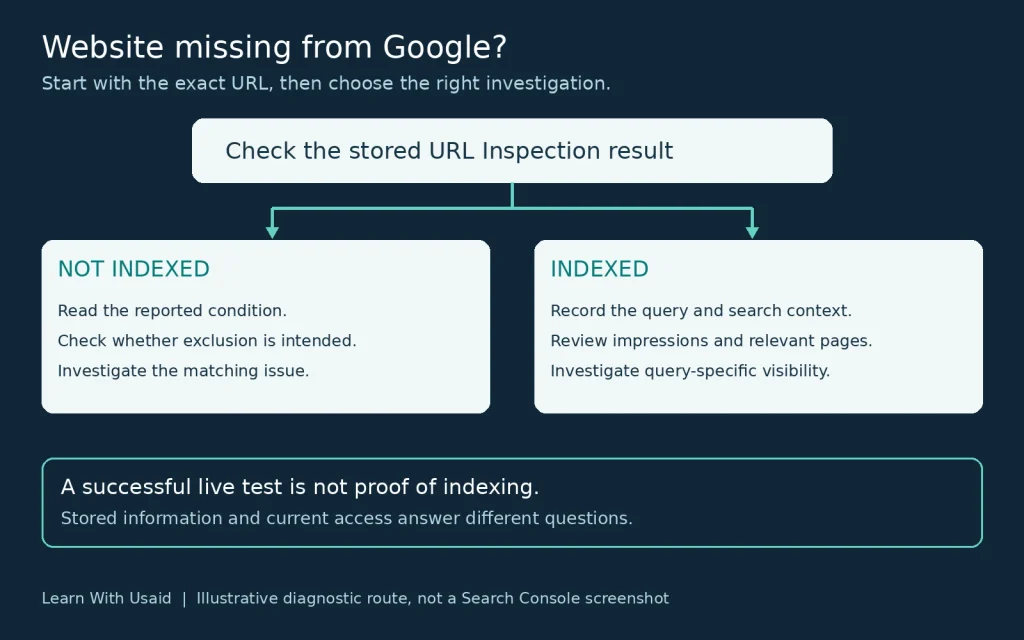
How is the live test different from the stored result?
The stored result describes Google’s recorded information. The live test checks the page as it is available now; it does not prove index inclusion or test every requirement for appearing in search.
| View | Question it helps answer |
|---|---|
| Stored inspection result | What does Google currently report about this URL in its index? |
| Live test | Can the current page pass the tested access and indexability checks? |
For the tool’s limits and result definitions, use Google’s URL Inspection documentation.
Does a site: search prove whether my website is indexed?
No. A site:example.com search is a useful spot check, but its results are not an exhaustive inventory. A missing result or a low count is not enough to establish that specific pages are unindexed.
Use URL Inspection for the exact page you own. Google’s site: operator documentation explains why the returned results and counts have limits.
Why are only some pages of my website indexed?
Google can index some URLs while excluding others because each page has its own content, access conditions, and relationship to alternate URLs. An indexed homepage does not establish that every blog post or service page is indexed.
Group affected URLs by reported reason and template, then inspect representative examples. Keep useful public pages separate from duplicate filters, account pages, and other URLs that do not need an independent search listing. Investigate a shared template problem when the same unintended condition appears across several important pages.
What should you do if the page is not indexed?
Match the investigation to the reported condition:
| Reported condition | Meaning or question | Next investigation |
|---|---|---|
| Crawled – currently not indexed | Google crawled the page but has not indexed it. | Review the page and template evidence; the status alone does not prove low quality or a penalty. |
| Discovered – currently not indexed | Google knows the URL but has not crawled it yet. | Review access, discovery paths, and relevant server evidence. |
| Blocked by robots.txt | Is the restriction intentional? | Inspect the matching crawl rule before changing it. |
| Excluded by noindex | Should this public page be excluded? | Check the directive and its source. |
| Alternate or duplicate page | Is another version correctly preferred? | Compare the URLs and canonical selection before treating this as a problem. |
Before correcting an exclusion, decide what the URL is for. A useful public service page and an account-only utility page may have different intended outcomes. Do not remove every restriction to make a report look cleaner.
Use Google’s Page Indexing report as the reference for the state, then follow the matching investigation rather than applying one universal fix.
See Google’s Page Indexing report guidance for each status. Keep intentional exclusions separate from useful public pages that need investigation.
Understanding what technical SEO includes can help you separate crawl access, content delivery, and URL-selection issues before changing settings.
Which technical checks should follow a not-indexed result?
Check the condition named in the report before changing settings. Use the following evidence to decide whether the page is behaving as intended:
| Check | Evidence to inspect | Correction boundary |
|---|---|---|
| Crawl access | The matching robots.txt rule and reported crawl permission. | Remove an unintended block only for content meant to be crawled. Robots.txt is not reliable search removal. |
| Indexing directive | A robots meta tag or X-Robots-Tag response header containing noindex. | Remove unintended noindex at its source. Google must be able to crawl the page to read the changed directive. |
| Preferred URL | Declared canonical, Google-selected canonical where available, and the contents of both URLs. | Correct conflicting signals if the wrong version is preferred; an intentional alternate may need no change. |
| Page delivery | HTTP response, redirects, server failures, and the content available in rendered output. | A working page should deliver its intended content. A missing page, failed script, or redirect to the wrong destination needs its own fix. |
Google documents robots.txt, noindex, and canonical signals separately because they serve different purposes. Ordinary duplicate URLs do not, by themselves, establish a penalty.
Why is my WordPress website or blog not showing on Google?
Check whether the missing post is published and public, then inspect its URL. For a public WordPress site, review Settings → Reading → Search Engine Visibility and confirm that “Discourage search engines from indexing this site” is not unintentionally selected.
Also check page-level SEO settings, the generated robots directives, and the canonical URL. A theme, plugin, or server setting can affect output, so installing another SEO plugin is not proof that the issue is fixed. Retest the public page after changing the responsible setting. See WordPress Reading settings.
If the homepage appears but a blog post does not, use the post’s own inspection result and check whether relevant pages link to it. Avoid treating a post-level problem as evidence that the whole blog is missing.
Can a Google Sites website appear in Google Search?
Yes, a public Google Sites website can appear in search, but using Google Sites does not guarantee indexing. Confirm that you published the site and that the published version is available to the intended public audience.
Review the setting that requests public search engines not display the site, and turn it off if search visibility is intended. Account or organization restrictions may limit sharing options. Then inspect the published URL, rather than an editor or preview address. Google’s publishing and sharing instructions describe these controls.
What if the page is indexed but absent for your query?
If the page is indexed, investigate visibility for the particular search rather than immediately changing crawl controls.
Record the query, country, device, and intended page. Review available Search Console impressions and clicks using comparable periods. Check whether a different page appears for that topic, then assess whether your intended page answers the searcher’s need.
For example, someone searching for a consultant may need service scope, relevant experience, and a way to make contact. A definition-only page may not meet that need. This is a hypothetical content-purpose mismatch, not evidence that a specific website has been penalized.
Why is my page indexed but getting no impressions or clicks?
Indexing does not guarantee that a page appears for a searched query. No impressions can reflect limited visibility or demand, the selected report filters, or an observation period too short to judge.
- Confirm the correct Search Console property, search type, date range, and exact page filter.
- Review impressions before clicks. An impression without a click is a different problem from no recorded visibility.
- Compare equivalent periods and separate the new page’s results from the whole site’s trend.
- Check whether the page answers the intended query with useful, specific information and whether a more suitable page already exists on your site.
Two days without impressions is not sufficient evidence that an article has failed or that a particular framework cannot work. Record a baseline and investigate a demonstrated problem rather than repeatedly rewriting the page to chase an immediate result.
Why can’t I find my website even when I search its name?
A name search can still be ambiguous, especially when other organizations use similar names. Check the exact homepage URL’s index status, then confirm that the page clearly identifies the business and its services.
To assess where the site appears, examine available query and page data in Search Console with the relevant country and device filters. A single manual search is only one observation; an average position is also not a permanent rank shared by every searcher.
Did the website disappear after a recent change?
Separate a new site from an established site with a measured decline. Record when the decline began, which pages are affected, and whether a redesign, URL move, content edit, or measurement change happened nearby. Also consider demand and search-result changes.
A nearby release date is a lead to investigate, not proof of causation. Preserve the old and new URL details so the next check can test a specific explanation.
| Record | What to write down |
|---|---|
| Timing | First observed decline and release date |
| Scope | Affected URLs, directory, or whole site |
| Change | Old URL, new URL, template or content edit |
| Evidence | Comparable report periods and observations |
Google’s traffic-drop guidance describes several possible causes and ways to investigate them.
Could a manual action, security issue, or removal hide the page?
Yes, these conditions can affect search visibility, but a decline alone does not identify which one occurred. Check Search Console’s Manual Actions, Security Issues, and Removals reports when the evidence warrants it.
If a manual action is reported, address the stated issue and follow the review process. If a security issue is reported, investigate and resolve the compromise. If an unintended temporary removal exists, review that request. A clean manual-action report does not rule out other causes of poor performance.
Use Google’s Manual Actions report and Security Issues report for their respective procedures. Do not assume that an algorithm update caused a decline merely because the dates overlap.
Should you request indexing or wait?
Requesting indexing can be appropriate for a new or meaningfully updated page after its relevant checks are complete. For multiple pages, review the sitemap workflow. A request does not guarantee inclusion or make repeated submissions a reliable shortcut.
Follow the guidance for the actual status. Google’s explanation of Crawled – Currently Not Indexed says routine resubmission is unnecessary for that state.
Keep a dated note of what changed and when it was requested or submitted. Continue monitoring the relevant report instead of making another unrelated edit whenever the status remains unchanged. A recorded sequence makes it easier to distinguish a verified correction from normal reporting or processing time.
Follow Google’s recrawl-request guidance. There is no guaranteed deadline, and repeated requests for the same address do not make crawling faster.
How long does it take for a website to appear on Google?
There is no guaranteed deadline. Google says crawling can take from a few days to a few weeks, and a crawl request still does not guarantee inclusion. Ranking for a particular query is a separate outcome.
Use the dates of publication, the last recorded crawl, and any verified correction to guide follow-up. Waiting is reasonable after the relevant checks; it is not a substitute for fixing an unintended restriction or unavailable page.
What evidence should you provide when asking for help?
A useful handoff includes the affected URLs, intended searches, recorded inspection results and recent changes. Explain which pages matter to the business and why. Include screenshots only when they show the relevant property and date without exposing unnecessary account information.
You can describe the problem in a short, specific form: “This service page is intended for this query. Here is the recorded status, the first observed date and the change that happened beforehand.” Leave unknown fields marked unknown.
If the evidence points in several directions, a website SEO audit can bring the technical, content and measurement findings together before you commit to implementation.