
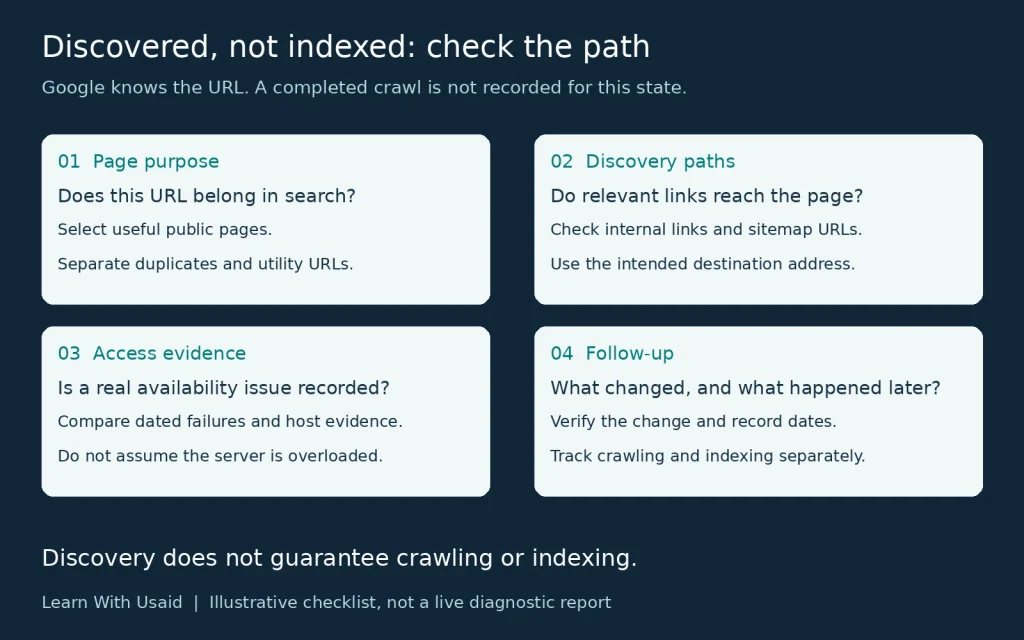
Discovered – Currently Not Indexed means Google knows the URL but has not crawled it yet. Review which affected pages should be searchable and examine discovery and access evidence before treating the delay as a specific technical fault.
What does Discovered – Currently Not Indexed mean?
Google knows the address, but it has not crawled it yet according to the reported state. The last crawl date is normally empty for this status.
Google describes rescheduled crawling, including an expected risk of overloading the site, as a typical explanation. That does not prove your host is failing now. Record the exact URL, status, and observation date before attributing the delay to a specific technical fault.
See Google’s Page Indexing report documentation for the status definition. The checks below help organize an investigation; they are not confirmed causes for every affected page.
How does it differ from the Crawled status?
The difference is whether crawling has happened. Both states can leave the page absent from search, but they need different starting questions.
If the reported status changes, record the new observation and follow the matching investigation. A move from Discovered to Crawled does not guarantee that indexing will follow immediately.
| Status | What has happened | Investigation focus |
|---|---|---|
| Discovered – currently not indexed | Google knows the URL but has not crawled it yet. | Page purpose, discovery paths, and relevant access evidence. |
| Crawled – currently not indexed | Google fetched the page but has not indexed it. | Post-crawl page and template evidence. |
Which affected URLs actually need attention?
Prioritize pages that have a clear reason to appear in search. Ask whether the URL serves a useful visitor task, remains current and represents the intended version of that content.
For illustration, a business’s main service page might merit prompt investigation. A duplicate filter combination or a utility URL might not need its own search result. Make that decision before treating a growing excluded-URL count as a business loss.
Create a short list with the page purpose, intended search role, reported state and observation date. The list should make it clear why each selected URL deserves attention. Where the intended outcome is uncertain, resolve that uncertainty first.
| Hypothetical URL role | Intended outcome | Question to investigate |
|---|---|---|
| Current public service page | Assess for search visibility | What evidence explains its current discovery/access state? |
| Tracking variant of that page | Assess its relationship to the preferred version | Does it need a separate result at all? |
| Utility page with no search role | Preserve the intended exclusion | Would changing its treatment benefit a visitor? |
Start by checking a page’s index status for the exact address in your verified property. URL Inspection distinguishes stored information from a live test; a successful live test is not proof of indexing. A private utility page needs appropriate access protection, not an indexing request.
Can important pages be reached through useful links and sitemaps?
Review how a person or crawler could reach the important page from relevant existing content. Check whether the expected internal links exist and point to the intended address. For a suspected orphan page, compare the full URL inventory with the crawl; a crawl alone may not reveal isolated pages.
Check the sitemap’s selected addresses and processing status as well. Google explains that sitemaps assist discovery but do not guarantee crawling or indexing.
In an illustrative three-page path, a service hub links to a useful service page, which links to a supporting guide. The links should make sense to the reader. Adding the guide to every unrelated page is not a substitute for a sensible pathway.
Because Google already knows this URL, discovery has happened. Reviewing links and the sitemap is a consistency check, not proof that an undiscovered page caused this status. Use Google’s sitemap guidance when reviewing the submitted addresses.
Is there evidence of an access or server problem?
Look for recorded availability problems before prescribing a server change. Useful evidence can include dated fetch failures, hosting incidents, response errors and relevant Crawl Stats observations.
Search Console’s Crawl Stats report provides aggregate request and host information. Its example URLs are a sample, so an address missing from that list does not prove it was never requested.
Compare the time of the observation with the affected period. If the site is accessible now but had an earlier incident, preserve both facts. If no access problem has been demonstrated, say so. The appropriate next step may be additional observation or a different investigation rather than buying a more expensive hosting plan.
| Observation to check | Evidence to collect | What it can support |
|---|---|---|
| Page failed to load at a recorded time | Exact URL, response or error, time, and host incident details | Investigating the documented availability problem. |
| A host-level crawl issue was reported | Relevant period and host status in Crawl Stats | Reviewing a broader availability pattern. |
| Page works in the current test | Dated result and any earlier failure records | Current access works; this does not disprove a past incident. |
Google’s Crawl Stats documentation explains the report’s scope and sampled URL examples. The report is primarily for advanced investigation; most small sites do not need routine analysis at this level.
Does a small site need specialist crawl-budget work?
Not automatically. A small business website should begin with useful pages, sensible internal paths, appropriate sitemap URLs, and any demonstrated access problems. A few delayed URLs do not establish an enterprise crawl-budget problem.
Google’s advanced guidance is aimed mainly at large or rapidly changing sites, but it also includes sites with a large proportion of URLs in the discovered state. The proportion and pattern matter, not just the raw count. Escalate the investigation when scale or evidence justifies it.
Use the applicability criteria in Google’s crawl-budget guidance. Neither changing hosting without evidence nor trying to force a crawler schedule is a substitute for diagnosing the actual pattern.
What changes and follow-up should you record?
Record what you changed, why you changed it and how you checked the result. A useful log includes the affected address, observation date, action, release date and later reported state.
For an illustrative missing-link correction, verify that the relevant page now contains the intended link. Then keep the later crawl or index observation as a separate result. Do not describe the link change as a successful indexing fix before that outcome is observed.
For an appropriate new or updated page, a crawl request may be an available option, but it is not a promise of inclusion. Avoid arbitrary waiting rules and repeated unrelated edits. Use the dates and evidence to decide whether the investigation needs a different scope.
| Field | Record |
|---|---|
| Before | Exact URL, intended role, status and date |
| Action | Specific change and supporting evidence |
| Verification | Whether the intended change is present |
| Follow-up | Later crawl/index status and observation date |
Google’s recrawl-request guidance covers new or updated pages. Repeated requests for the same URL do not speed up crawling, and neither a request nor a sitemap submission guarantees index inclusion.
When should you ask for a website audit?
Consider an audit when important pages remain affected and you need help distinguishing architecture, availability, page purpose, and wider site patterns. Provide a small representative sample instead of an unexplained export of every excluded address.
A useful handoff includes:
- The affected URLs and why they matter to visitors.
- The reported status and observation dates.
- The relevant link and sitemap checks already completed.
- Any dated access failures or hosting incidents.
- Changes already made and the result of each verification.
For help reviewing that evidence, explore Learn With Usaid’s website SEO audit. Ask for a supported next action and a way to verify it, rather than a promise that every URL will become indexed.